Observables
Observables form the reactive state of your MobX Application. You can use the API directly or rely on annotations to make it easier. The reactive state of your application can be divided into the Core State and Derived State. Core State is the state inherent to your business domain, where as Derived State is state that can be derived from the Core State.
Reactive State = Core-State + Derived-State
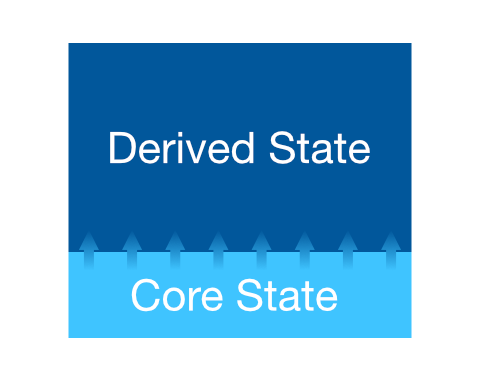
As you can tell from the image above, the Derived-State is almost always read-only. In the MobX parlance, derived-state is also called computed properties, or just computeds.
The derived state can be much bigger than the core-state. This is understandable as the number of variations in which the core-state can be visualized can keep increasing over time. All of these are projections from the core-state. For example, the same list of items can be visualized as the raw list, a table, chart or some custom visualization. The view-specific data can be derived from the same core-state.
Observable
Observable(T initialValue, {String name, ReactiveContext context})
T initialValue: the initial value for theObservableornullotherwise.String name: a name to identify during debuggingReactiveContext context: the context to which this observable is bound. By default, all observables are bound to the singletonmainContextof the application.
An Observable is used to track a single value, either primitive or complex. Whenever it changes value, it will fire a notification so that all connected reactions will re-execute.
If you use a Store class, you could do the following to annotate observable properties of the class:
Computed
Computed(T Function() fn, {String name, ReactiveContext context})
T Function() fn: the function which relies on observables to compute its value.String name: a name to identify during debuggingReactiveContext context: the context to which this computed is bound. By default, all computeds are bound to the singletonmainContextof the application.
Computeds form the derived state of your application. They depend on other observables or computeds for their value. Any time the depending observables change, they will recompute their new value. Computeds are also smart and cache their previous value. Only when the computed-value is different than the cached-value, will they fire notifications. This behavior is key to ensure the connected reactions don't execute unnecessarily.
Caching
The caching behavior is only for notifications and not for the value. Calling a computed property will always evaluate and return the value. There is no caching on the computation itself. However, notifications fire only when the computed value is different from the previous one. This is where the caching behavior applies.
With annotations, this can become easier to use:
Why do we need an
Observable***Class for types likeFuture,Stream,List,Map,Set?The core types provided by Dart are not reactive by nature. They don't participate in the MobX reactive system and hence changes in them are not notified to the
Observer. To have a well-behaving reactive system, we need data-structures that are also reactive inherently. This requires that we have anObservable-version of the core types likeList,Set,Map,FutureandStream.The following set of types will help you build stores that participate well in the MobX world. Use them when you need reactive data-structures that are MobX-ready!
ObservableList
ObservableList({ReactiveContext context})
ReactiveContext context: the context to which this list is bound. By default, allObservableLists are bound to the singletonmainContextof the application.
An ObservableList gives you a deeper level of observability on a list of values. It tracks when items are added, removed or modified and notifies the observers. Use an ObservableList when a change in the list matters. You can couple this with the @observable annotation to also track when the list reference changes, eg: going from null to a list with values.
ObservableMap
ObservableMap({ReactiveContext context})
ReactiveContext context: the context to which this map is bound. By default, allObservableMaps are bound to the singletonmainContextof the application.
An ObservableMap gives you a deeper level of observability on a map of values. It tracks when keys are added, removed or modified and notifies the observers. Use an ObservableMap when a change in the map matters. You can couple this with the @observable annotation to also track when the map reference changes, eg: going from null to a map with values.
ObservableSet
ObservableSet({ReactiveContext context})
ReactiveContext context: the context to which this set is bound. By default, allObservableSets are bound to the singletonmainContextof the application.
An ObservableSet gives you a deeper level of observability on a set of values. It tracks when values are added, removed or modified and notifies the observers. Use an ObservableSet when a change in the set matters. You can couple this with the @observable annotation to also track when the set reference changes, eg: going from null to a set with values.
ObservableFuture
ObservableFuture(Future<T> future, {ReactiveContext context})
Future<T> future: The future that is tracked for status changes.ReactiveContext context: the context to which this observable-future is bound. By default, allObservableFutures are bound to the singletonmainContextof the application.
The ObservableFuture is the reactive wrapper around a Future. You can use it to show the UI under various states of a Future, from pending to fulfilled or rejected. The status, result and error fields of an ObservableFuture are observable and can be consumed on the UI.
Here is a simple LoadingIndicator widget that uses the ObservableFuture to show a progress bar during a fetch operation:
ObservableStream
ObservableStream(Stream<T> stream, {T initialValue, bool cancelOnError, ReactiveContext context})
Stream<T> stream: The stream that is tracked forstatusandvaluechanges.T initialValue: The starting value of the stream.bool cancelOnError: Should the stream be cancelled on error. Default is set tofalse.ReactiveContext context: the context to which this observable-stream is bound. By default, allObservableStreams are bound to the singletonmainContextof the application.
Similar to ObservableFuture, an ObservableStream provides a reactive wrapper around a Stream. This gives an easy way to observe and re-render whenever there is new data, or error or a status change on the ObservableStream.
Atom
An Atom is at the core of the MobX reactivity system. It tracks when it is observed and notifies whenever it changes. Note that an Atom does not store any value. That is the responsibility of the Observable, which extends Atom to add the storage. You would rarely need to use an Atom directly. Instead, depend on an Observable for most use-cases.
Aside
The
mobx_codegenpackage uses anAtominternally for all the@observableannotated fields.
Atomic Clock
Here is a simple clock that relies on an Atom to notify every second.
Full code can be seen here.
- When the clock gets observed the first time, we start the timer (
_startTimer). - When the clock is no longer observed (eg: when a reaction is disposed), we dispose off the timer (
_stopTimer). - In each tick of the timer, we call
_atom.reportChanged(). This notifies the MobX reactive system that the atom has changed value and all connected reactions should be re-executed. - When the
nowproperty is read the first time, the clock gets observed and starts ticking. It also fires the_atom.reportObserved()to make MobX start tracking this atom.